About DSLR Controller
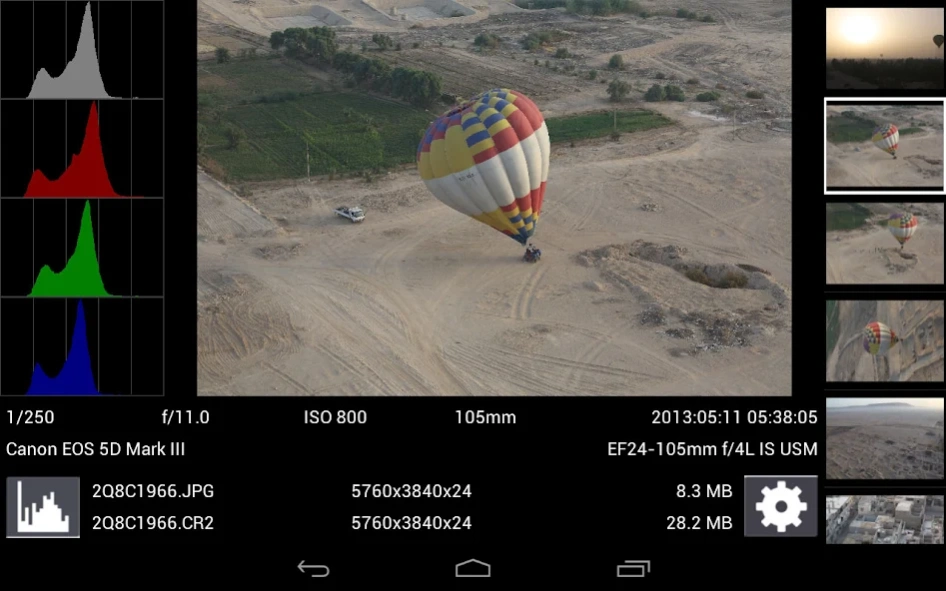
DSLR Controller was the first and remains the best app to fully control your Canon EOS DSLR from your Android device, through USB cable or Wi-Fi connection. No computer or laptop required, no root required, only a...
DSLR Controller was the first and remains the best app to fully control your Canon EOS DSLR from your Android device, through USB cable or Wi-Fi connection. No computer or laptop required, no root required, only a compatible mobile device, a compatible camera, and if connecting through USB, the right cable.
We strongly suggest you read up on the website ( http://dslrcontroller.com/ ) about what DSLR Controller can do, how it works, and how to use it, before purchasing. The website contains a wealth of information you should know before using.
Not all devices are compatible, especially if you want to use a USB connection. For a free app you can use to test compatibility, see the "Remote Release" app ( http://market.android.com/details?id=eu.chainfire.remoterelease ). If you need a refund, go to our website ( http://dslrcontroller.com/ ) and follow the instructions in the FAQ entry. We cannot process refunds through email.
Usage notes, feature lists, device compatibility lists, changelogs, FAQs, can all be found on our website: http://dslrcontroller.com/
Most questions should go to the support and discussion thread at XDA-Developers.com:
http://forum.xda-developers.com/showthread.php?t=1202082
Features
Features include but are not limited to:
- Live View
- Auto Focus (tap Live View)
- Manual focus adjustments (in AF mode)
- Histogram
- Zoom control
- Grid and aspect ratio overlay
- Bulb capture
- Continuous capture
- Image review (+ follow shot, gallery)
- Image filters (peaking, contrast, channel mask, grayscale, 4 modes/filter)
- Video recording
- HDR/Auto Exposure Bracketing
- Focus Bracketing (incl. HDR)
- Focus A-B
- Mirror Lockup support
- Timelapse (incl. HDR)
- Wi-Fi Passthrough
- Extensive modification of settings
-- Shutter speed
-- Aperture
-- ExpComp and Bracket
-- ISO speed
-- Auto-Focus Mode
-- Focus and Zoom area (tap-and-hold Live View)
-- Picture Style
-- Drive Mode
-- White Balance
-- Color Temperature
-- Auto-Lighting Optimizer
-- Metering Mode
-- Image and video quality and format
Available options depend on the mode you have your camera set to (M, Av, Tv, etc) and camera model. Refer to the website ( http://dslrcontroller.com/ ) for further details.
Supported Android devices :
If you are connecting using Wi-Fi, virtually all modern Android devices are supported (your camera needs Wi-Fi support, though). If you are connecting over USB, your device needs USB host support - most recent devices do. Please see the 'Devices' section on our website ( https://dslrcontroller.com/devices.php ) for further information.
If your camera only supports USB, you can modify a TL-MR3040 to provide a Wi-Fi connection ( http://dslrcontroller.com/guide-wifi_mr3040.php )
Supported Canon EOS models :
Newer cameras than listed below are usually supported.
Full support:
- 1D Mark IV
- 1D X
- 1D X Mark II
- 5D Mark II
- 5D Mark III
- 5D Mark IV
- 5Ds(r)
- 50D
- 500D
- 550D
- 6D
- 60D
- 600D
- 650D
- 7D
- 7D Mark II
- 70D
- 700D
- 750D
- 760D
- 80D
- 1100D
- 1200D
- 1300D
- 100D
Limited support:
- 1D mk III
- 1Ds mk III
- 30D
- 40D
- 400D
- 450D
- 1000D
No support:
- pre-2006 models
- EOS M mirrorless devices (work in progress)
Let us know which hardware you are using with DSLR Controller!
Previous Versions
Here you can find the changelog of DSLR Controller since it was posted on our website on 2013-08-22 16:41:09.
The latest version is 1.06 and it was updated on 2026-10-12 18:42:41. See below the changes in each version.
DSLR Controller version 1.06
Updated At: 2017-08-18
Changes: v1.06:
- Fixed crash when starting video playback with MX Player
v1.05:
Release notes: https://plus.google.com/+Chainfire/posts/duh4LAqcDMC
(c) 2017
Added:
- Night mode
- Notice for disabled shuttercounter (5D4+?)
Improved:
- High speed shooting handling
- Communication error notice
Fixed:
- Various 5D4 issues
- Level circle sometimes no longer drawn filled on some devices while recording
DSLR Controller version 1.02
Updated At: 2016-11-08
Changes: NOTICE: There are still a few issues with 5D Mark IV support when using USB. We advise using NFC-initiated Wi-Fi for now!,- Added: Flash firing control (long press to popup),- Improved: Establishing Wi-Fi connection on some devices,- Fixed: Errors while focus bracketing on new cameras,- Fixed: Fast-capture error in some cases,- Fixed: Move-focus error in some cases
DSLR Controller version 0.98.3
Updated At: 2013-05-01
Changes: Several fixes and updates
Disclaimer
Official Google Play Link
We do not host DSLR Controller on our servers. We did not scan it for viruses, adware, spyware or other type of malware. This app is hosted by Google and passed their terms and conditions to be listed there. We recommend caution when installing it.
The Google Play link for DSLR Controller is provided to you by apps112.com without any warranties, representations or guarantees of any kind, so access it at your own risk.
If you have questions regarding this particular app contact the publisher directly. For questions about the functionalities of apps112.com contact us.